

OVENTRA OMS
Track every order from capture to delivery
OVENTRA OMS brings orders from events, dealers, distributors and field sales into one place, where they are approved, processed and tracked to completion.

Why OVENTRA OMS?
Orders reach a business from many directions, field sales, dealers, events, stores. When each channel is handled differently, orders are re-keyed, status is unclear, and customers and partners keep asking the same question: where is my order?
OVENTRA OMS is intended to centralise orders, from capture, through processing and tracking, to management across the order lifecycle.
In the OVENTRA360 ecosystem, OMS is a natural connecting point between modules that create orders (Event, SFA, DMS, POS) and modules that fulfil them (Dispatch).
Common challenges
- Orders arriving from multiple channels in different formats
- Manual re-entry of orders into downstream systems
- Limited visibility of order status across teams
- No single view of the order lifecycle
OVENTRA OMS at a glance
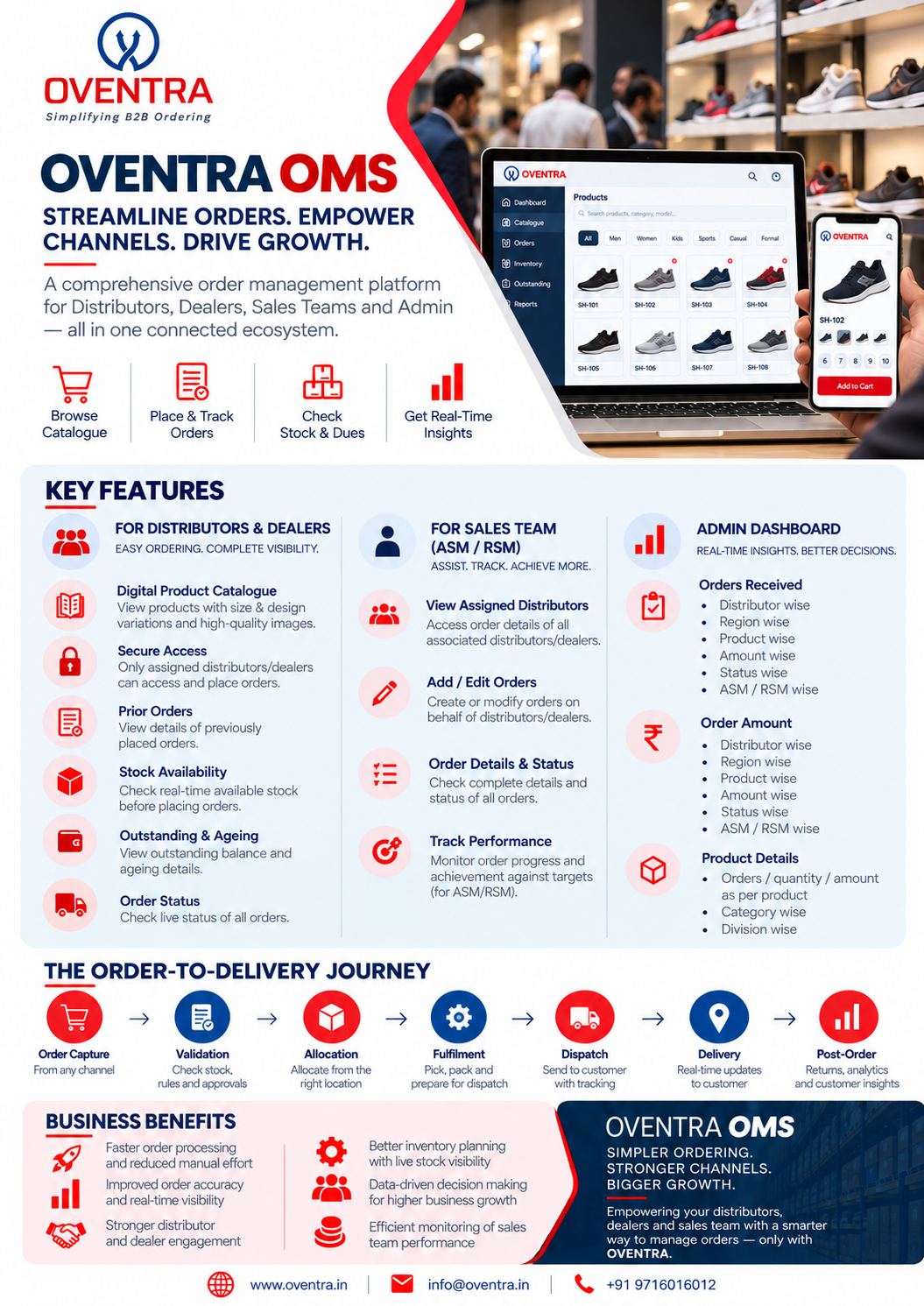
Streamline orders, empower channels and drive growth: one order management platform for distributors, dealers, sales teams and admin.
- Browse catalogue
- Place and track orders
- Check stock and dues
- Get real-time insights
For distributors and dealers
Easy ordering, complete visibility.
- Digital product catalogueView products with size and design variations and high-quality images.
- Secure accessOnly assigned distributors and dealers can access and place orders.
- Prior ordersView details of previously placed orders.
- Stock availabilityCheck real-time available stock before placing orders.
- Outstanding and ageingView outstanding balance and ageing details.
- Order statusCheck the live status of all orders.
For sales teams (ASM / RSM)
Assist, track, achieve more.
- View assigned distributorsAccess order details of all associated distributors and dealers.
- Add and edit ordersCreate or modify orders on behalf of distributors and dealers.
- Order details and statusCheck complete details and status of all orders.
- Track performanceMonitor order progress and achievement against targets.
Admin dashboard
Real-time insights, better decisions.
- Orders receivedDistributor, region, product, amount, status and ASM / RSM wise.
- Order amountDistributor, region, product, status and ASM / RSM wise.
- Product detailsOrders, quantity and amount by product, category and division.
The order-to-delivery journey
- Order captureFrom any channel
- ValidationCheck stock, rules and approvals
- AllocationAllocate from the right location
- FulfilmentPick, pack and prepare for dispatch
- DispatchSend to customer with tracking
- DeliveryReal-time updates to customer
- Post-orderReturns, analytics and customer insights
Business benefits
- Faster order processing and reduced manual effort
- Improved order accuracy and real-time visibility
- Stronger distributor and dealer engagement
- Better inventory planning with live stock visibility
- Data-driven decision making
- Efficient monitoring of sales team performance
Capability areas
Select a capability to see what it covers. Specific features, configuration and availability are confirmed with the Oventra team during your demonstration.
Order capture
Bring orders from different sources into one structured place.
Order processing
Move each order through approval and processing before fulfilment.
Order tracking
Track where each order is in its lifecycle.
- Order statuses such as pending, approved, processing, dispatched and delivered
- Pending-order and order-status reports
Order lifecycle visibility
Give teams a shared view of order status.
Order management workflows
Handle the routine work of managing orders in one place.
Live dashboard
Monitor incoming orders, their value and their progress in real time.
Distributor ordering, step by step
The distributor ordering workflow that feeds OVENTRA OMS, from login to order tracking, on real app screens.

Step 01 of 05
Distributor login
Each distributor signs in to a personal dashboard to browse products, place orders and see order progress in real time, with current offers, value and quantity against target, and the applicable scheme.

Step 02 of 05
Browse categories
The catalogue is organised into categories that distributors and dealers can browse at any time, from Android or iOS.

Step 03 of 05
Browse and select products
Distributors see available stock and rates, and enter quantities for each colour and size.

Step 04 of 05
Place order
Before submitting, the distributor reviews the order summary. The order is placed with its location and time recorded.

Step 05 of 05
Track order
My Orders lists pending, submitted and completed orders with their values, so distributors don't need to call for updates.
How it works
A typical business workflow with OVENTRA OMS. This is illustrative, your actual workflow is defined during discovery.
Step 1 of 5
Capture the order
Orders arrive from events, field sales, partners or stores.
Step 2 of 5
Validate and process
Orders are reviewed and processed according to your workflow.
Step 3 of 5
Prepare for fulfilment
Processed orders are prepared for dispatch, where connected.
Step 4 of 5
Track status
Order status is tracked through the lifecycle.
Step 5 of 5
Close and review
Completed orders are closed and reviewed.
OVENTRA OMS: what it is and how it helps
Plain answers about OVENTRA OMS (order management solution): who it is for, how it relates to other OVENTRA solutions, integration and how to see a demonstration.
What is OVENTRA OMS?
OVENTRA OMS is the order management solution in OVENTRA360, a connected business ecosystem for manufacturers and brands from Giga Soft Systems Private Limited. OVENTRA OMS brings orders from events, dealers, distributors and field sales into one place, where they are approved, processed and tracked to completion. OVENTRA OMS is intended to centralise orders, from capture, through processing and tracking, to management across the order lifecycle.
Which businesses need OVENTRA OMS?
OVENTRA OMS is intended for manufacturers and brands that receive orders from several channels, field sales, dealers and distributors, business events or stores, and need one view of the order lifecycle. Typical users include order-processing and customer service teams, sales and channel teams, operations and fulfilment teams and dealers and distributors. Industries that commonly explore it include FMCG & consumer goods, Electronics & electricals, Footwear & apparel and Pharmaceuticals & healthcare.
How does OVENTRA OMS manage the order lifecycle?
OVENTRA OMS centralises order capture, processing, tracking and management. Orders are captured in one structured place, validated and processed according to your workflow, prepared for fulfilment, tracked through their status and closed, giving sales, customer service and operations teams a shared view of where each order stands.
Which orders can OVENTRA OMS bring together?
OVENTRA OMS is designed to sit between the OVENTRA solutions that create orders, OVENTRA Event, OVENTRA SFA, OVENTRA DMS and OVENTRA POS, and OVENTRA Dispatch, which supports dispatch and delivery. Which order sources are connected for your business is confirmed during discovery.
How does OVENTRA OMS relate to other OVENTRA solutions?
OVENTRA OMS is designed to complement other solutions in the OVENTRA360 ecosystem: OVENTRA Event, event-based order capture and processing, where the connection is supported; OVENTRA DMS, channel ordering from dealers and distributors; OVENTRA Dispatch, dispatch coordination and delivery visibility for processed orders; OVENTRA SFA, orders booked by field sales teams. The connections that apply to your business are confirmed during discovery.
What integrations are possible with OVENTRA OMS?
Orders and order status are among the most common data areas to exchange with an ERP. Product, price and partner masters are typical inputs. Inventory or availability data may be relevant, its source and timing are evaluated during discovery. SAP, Tally, BUSY, APIs and file-based exchange are integration discussion areas: compatibility, data scope, technical method, security and implementation effort are assessed during discovery, and no prebuilt connectors are claimed.
How can a business request a demonstration of OVENTRA OMS?
Select “Enquire about OVENTRA OMS” on this page to message the Oventra team at +91 97160 16012 with a pre-filled request about OVENTRA OMS, or send a detailed enquiry through the contact form. Specific features and configuration are confirmed during the demonstration.
How OVENTRA OMS connects
Select a related OVENTRA solution to see how it works with OVENTRA OMS. The connections that apply to your business are confirmed during discovery.
OVENTRA OMSOVENTRA Event
OVENTRA Event: event ordering solution
Event-based order capture and processing, where the connection is supported.
OVENTRA Event lets partners order on their phones at dealer meets, distributor conferences, exhibitions and product launches, while your team watches the totals build on a live dashboard.
Explore OVENTRA EventOVENTRA OMSOVENTRA DMS
OVENTRA DMS: dealer & distributor management
Channel ordering from dealers and distributors.
OVENTRA DMS gives distributors and dealers their own app to browse the catalogue, check prices, schemes and stock, place orders and follow them, and gives you a view of the whole network.
Explore OVENTRA DMSOVENTRA OMSOVENTRA Dispatch
OVENTRA Dispatch: dispatch & delivery management
Dispatch coordination and delivery visibility for processed orders.
OVENTRA Dispatch plans what goes out, records shipments and shows where each delivery is, so fewer people need to call and ask.
Explore OVENTRA DispatchOVENTRA OMSOVENTRA SFA
OVENTRA SFA: sales force automation
Orders booked by field sales teams.
OVENTRA SFA gives field sales teams one app for beat plans, visits, order booking and targets, and gives managers a clear view of what happened in the market each day.
Explore OVENTRA SFAWho uses it
- Order-processing and customer service teams
- Sales and channel teams
- Operations and fulfilment teams
- Dealers and distributors


Working with your existing systems
If OVENTRA OMS needs to exchange data with your ERP or other business systems, these are typical areas to assess. Compatibility, data scope, technical method, security and effort are confirmed during discovery.
- Orders and order status are among the most common data areas to exchange with an ERP.
- Product, price and partner masters are typical inputs.
- Inventory or availability data may be relevant, its source and timing are evaluated during discovery.
OVENTRA OMS: frequently asked questions
What is an order management solution?
An order management solution centralises how orders are captured, processed and tracked. OVENTRA OMS is OVENTRA360's solution for managing the order lifecycle.
Can OVENTRA OMS receive orders from other OVENTRA modules?
OMS can be explored alongside Event, SFA, DMS and Dispatch. Which connections apply to your business is confirmed during discovery.
Does OVENTRA OMS replace our ERP?
OVENTRA OMS is positioned as an order management solution, not an ERP replacement. How it works alongside your ERP is part of integration discovery.
Can customers see order status?
Visibility for partners and customers depends on your setup. This is discussed during the demonstration.
See OVENTRA OMS with our team
Share your requirements and arrange a demonstration of OVENTRA OMS (order management solution).